Chmod Calculator
Octal, Symbolic, Ready to Copy
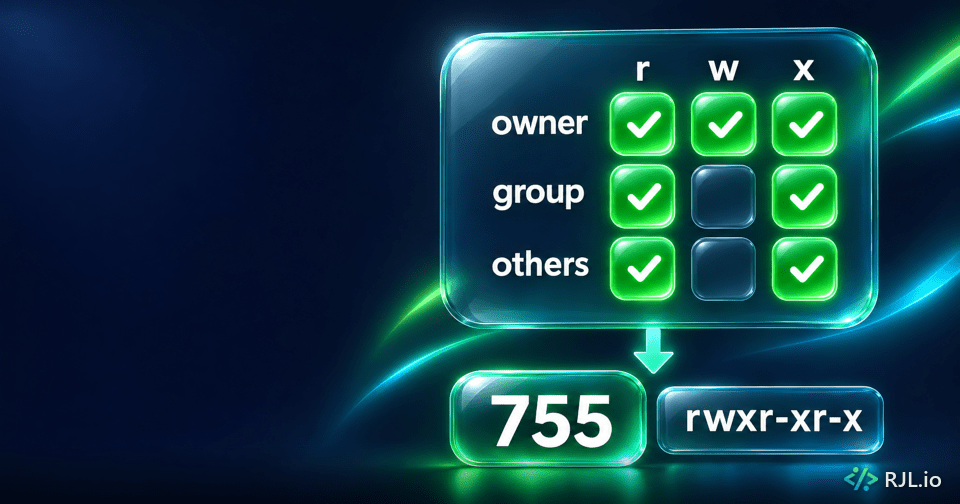
Tick the boxes, get the number. A read, write and execute grid for owner, group and others, plus setuid, setgid and sticky, kept in sync with the octal and rwxr-xr-x fields and the exact chmod command to copy. 100% client-side. Zero data stored.
Chmod Calculator Tool
Permissions
Special bits
Common presets
Mode and Command
Type in either field. The symbolic field also accepts the ten-character form that ls -l prints, such as -rwxr-xr-x or drwxr-xr-x.
What This Mode Means
Common Use Cases
SSH Keys and Secrets
SSH refuses a private key that others can read. Set it to 600 (or 400) and the "unprotected private key file" error goes away.
Web Server Files
The usual split for a site is 644 for files and 755 for directories, so the server can read everything but nothing is writable by the world.
Make a Script Executable
"Permission denied" on a shell script usually means the execute bit is missing. Copy chmod 755 script.sh or just u+x.
Shared Team Directories
Give a group write access with 775, and add setgid (2775) so new files keep the directory's group instead of the creator's.
Read an ls -l Listing
Paste -rwxr-x--- from a directory listing and see it as the octal number 750, with each class spelled out in words.
Audit Before You Run
Check a command from a tutorial before you paste it. A warning appears for 777, world-writable files and setuid programs.
Chmod Reference
Common Modes and What They Are For
| Octal | Symbolic | Typical use |
|---|---|---|
| 644 | rw-r--r-- | Ordinary files: pages, images, documents |
| 600 | rw------- | Private files: SSH private keys, .env files |
| 755 | rwxr-xr-x | Programs, scripts and directories |
| 700 | rwx------ | Private directories such as ~/.ssh |
| 775 | rwxrwxr-x | Directories a whole group edits |
| 664 | rw-rw-r-- | Files a group edits together |
| 640 | rw-r----- | Settings a group may read but not change |
| 750 | rwxr-x--- | Programs for the owner and one group |
| 400 | r-------- | Read-only secrets and keys |
| 1777 | rwxrwxrwt | Shared temp directories like /tmp |
| 2775 | rwxrwsr-x | Group directories where new files inherit the group |
What Each Bit Does on a File and a Directory
| Bit | On a file | On a directory |
|---|---|---|
| r (4) | Read the contents | List the names inside |
| w (2) | Change the contents | Create, delete and rename entries (needs x too) |
| x (1) | Run it as a program | Enter it and reach files by name |
| setuid (4000) | Run as the file's owner | Ignored on Linux |
| setgid (2000) | Run with the file's group | New files inherit the directory's group |
| sticky (1000) | Ignored on modern systems | Only an entry's owner can delete or rename it |
Add the numbers
Read is 4, write is 2, execute is 1. Add them per class: rwx is 4 + 2 + 1 = 7, r-x is 4 + 1 = 5, so rwxr-xr-x is 755.
Capital S and T
A lowercase s or t means the special bit and execute are both set. A capital S or T means the special bit is set but execute is not, which is usually a mistake.
u, g, o and a
In symbolic commands u is the owner, g the group, o others and a all three. The operators are + to add, - to remove and = to set exactly.
Four digits
A fourth leading digit holds the special bits: 4 setuid, 2 setgid, 1 sticky. So 1777 is sticky plus rwxrwxrwx, and 755 is the same as 0755.
This tool works out the mode and writes the command. It does not change any file, and it cannot see your files, owners or groups. It covers the classic Unix permission bits only, not ACLs, extended attributes or Windows permissions. A 3-digit numeric chmod on a directory keeps that directory's existing setuid and setgid bits on GNU systems; use the symbolic command to clear them.
Frequently Asked Questions
Why We Built This Chmod Calculator
Almost everyone who works on a server looks up chmod more than once. The numbers are easy to forget, the symbolic form is easy to mistype, and a wrong answer from a forum post can leave a private key readable by the whole machine. We wanted one page where you tick what you mean, read the number back, and copy a command you can check at a glance.
The grid, the octal field and the symbolic field are always in sync, so you can start from whichever you have: a number from a tutorial, an ls -l line, or just an idea of who should read and write. Plain-English lines say what the mode allows, and warnings flag 777, world-writable files and setuid programs before they get pasted into a terminal. Everything runs in your browser and nothing you type is sent anywhere.
The Chmod Calculator is part of RJL.io's collection of free developer tools. Schedule jobs with the Cron Expression Generator, plan networks with the Subnet Calculator, and check your pipelines with the GitHub Actions Validator.